
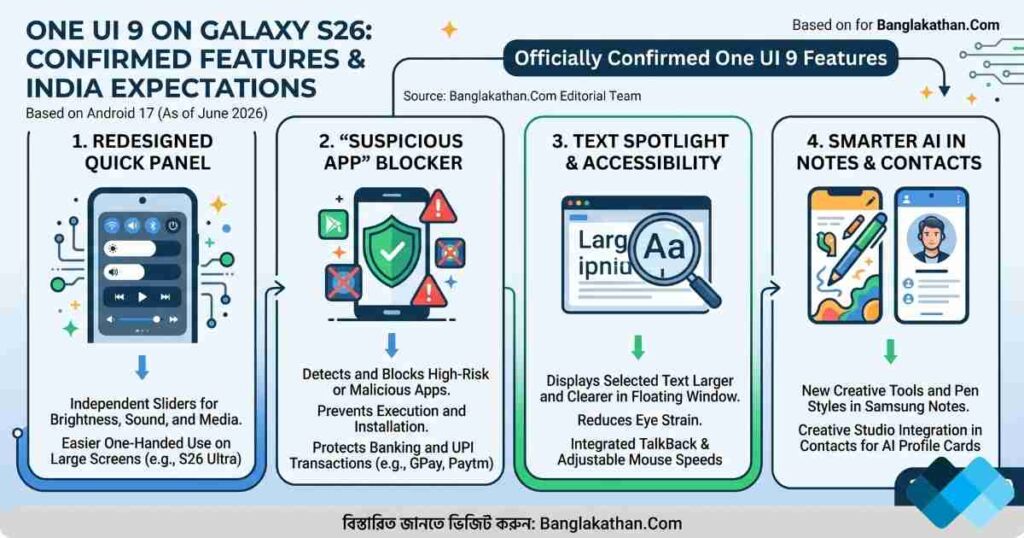
One UI 9 is Samsung’s next major software layer based on Android 17. With the Galaxy S26 series having launched earlier this year, Samsung officially kicked off the One UI 9 Beta program in May 2026. The update brings a redesigned Quick Panel, the new “Text Spotlight” feature, smarter AI in Contacts and Notes, and aggressive security features to block malicious apps. The final stable update is expected to roll out to all Indian users later this year.
Samsung’s One UI updates always matter, especially for users who want a smooth, practical, and feature-rich Android experience. With the Galaxy S26 already dominating the premium flagship market in India since early 2026, millions of users are eagerly anticipating the leap to One UI 9.
The short version is simple: One UI 9 is less about flashy, confusing redesigns and more about smart customization, powerful accessibility, and rock-solid privacy.
Here is exactly what Indian users can expect from this massive Android 17 update.
What Is One UI 9 on the Galaxy S26?
One UI 9 is Samsung’s brand-new software interface built on top of Android 17. Since the Galaxy S26 series launched out-of-the-box with Android 16, this will be its first major OS upgrade.
Based on the official Beta currently in testing, the update significantly improves:
- UI customization (especially the Quick Panel)
- AI-powered creative tools
- Text accessibility and reading features
- Proactive malware and app security
For Indian buyers, these upgrades matter. A smartphone in India is a true all-in-one hub used for long commutes, mixed work profiles, heavy social media use, and daily UPI payments. The One UI 9 update makes all of those tasks notably safer and easier.
Officially Confirmed One UI 9 Features
Samsung officially unveiled the One UI 9 Beta in May 2026. Here are the confirmed features that are changing the Galaxy S26 experience.
1. The Redesigned Quick Panel
The updated Quick Panel gives users much greater control over their layout. With One UI 9, the brightness, sound, and media player settings are now independently adjustable. You get more sizing options to suit your personal preferences, making one-handed use on large screens (like the Galaxy S26 Ultra) much easier.
2. Advanced Security: The “Suspicious App” Blocker
Privacy and banking security are top concerns in India due to rising SMS and app-based scams.
One UI 9 introduces a brilliant new layer of protection: when it detects new high-risk or suspicious apps, it warns you, actively blocks their execution and installation, and recommends deletion. If you use your phone for banking and UPI transactions via PhonePe, GPay, or Paytm, this feature alone makes the update worth it.
3. Text Spotlight & Accessibility Upgrades
For reading long texts, news articles, or documents on the go, One UI 9 introduces Text Spotlight. This feature displays selected text larger and more clearly in a floating window, reducing eye strain. Furthermore, mouse key speeds are now adjustable, and Google and Samsung’s TalkBack features have been combined into one seamless package.
4. Smarter AI in Notes and Contacts
Samsung is pushing AI creativity further. Samsung Notes has gained new creative tools, including decorative tapes and a wider variety of pen styles[2]. Meanwhile, the Contacts app now has direct integration with Creative Studio, allowing you to generate personalized, AI-driven profile cards for your contacts without switching apps.
What Indian Buyers Should Keep in Mind Before Buying the S26 Today
If you haven’t purchased the Galaxy S26 yet but are planning to, don’t just focus on the camera megapixels or the Snapdragon 8 Elite Gen 5 processor. Check these practical elements:
1. The 7-Year Software Promise
Samsung now offers 7 years of OS and security updates for its latest flagships. Buying the S26 means One UI 9 is just the first of many updates; your phone will be supported well into the 2030s.
2. Heat Management in Indian Weather
Indian summers are notoriously tough on electronics. Handling outdoor 5G navigation, 4K camera recording, and gaming requires strong thermal management. The S26 handles this beautifully via hardware vapor chambers, but the One UI 9 software is expected to further optimize battery drain and thermal throttling under heavy loads.
Real-Life Benefits for Everyday Indian Users
Here is where One UI 9 genuinely helps different types of users:
- For Office Users: The combined TalkBack features and enhanced security blocks ensure your office documents and banking apps remain completely uncompromised].
- For Content Creators: Seamless integration of Creative Studio and independent media controls in the Quick Panel speed up media sharing and volume management.
- For Students & Avid Readers: The Text Spotlight feature is a game changer for reading PDFs or long articles on crowded trains and buses[2].
Important Warning: Should You Install the Beta?
Since the One UI 9 Beta program is currently active, you might be tempted to enroll your Galaxy S26 to get the features early. However, Indian users should be cautious.
Known Limitations of Beta Software:
- UPI and Banking Apps May Break: Beta operating systems often fail Indian banking security checks (SafetyNet/Play Integrity). Apps like SBI YONO, Google Pay, or Paytm might refuse to open until the stable version releases.
- Early Bugs: You might face random battery drains, app crashes, or unexpected heating during the early beta stages.
The Verdict: If your Galaxy S26 is your primary phone for daily payments and work, wait for the official stable release coming later this year.
Tips to Get the Best Experience When Stable One UI 9 Arrives
Once the final, stable One UI 9 update hits your Galaxy S26, use these simple steps:
- Update all apps via the Play Store & Galaxy Store first: This prevents app crashes on the new Android 17 OS.
- Restart the phone after the update: Helps the system processes settle.
- Customize the new Quick Panel: Rearrange the new independent sound, brightness, and media sliders to fit your thumb’s natural reach.
- Review your Security limits: Make sure the new suspicious app blocker is toggled “On” to keep your data safe.
FAQ
When will the stable One UI 9 release for the Galaxy S26 in India?
While the Beta launched in May 2026, the stable Android 17 / One UI 9 rollout is officially expected “later this year,” likely around October or November 2026.
Does One UI 9 change the overall look of my phone?
It is more of a refinement than a total visual overhaul. The biggest visual changes are in the Quick Panel layout, the floating Text Spotlight window, and integrated Creative Studio tools.
Will my UPI apps work on One UI 9?
They will work perfectly on the stable release. However, if you download the current One UI 9 Beta, your UPI apps may temporarily stop working due to security restrictions.
Final Verdict
One UI 9 built on Android 17 proves that Samsung is listening to its users. By offering independent media controls, powerful reading accessibility features, and strict, system-level blocks against malicious apps, the Galaxy S26 is becoming an even better flagship. For Indian users—who demand high security, easy multitasking, and personalization—the upcoming stable release is absolutely worth the wait.
Sources
